Meet your reading companion

Folarin AI

Stay in the story.
Understand more.

A thought, a difficult sentence, a question you cannot leave alone. Bring it to Folarin AI, right where you read.

One familiar companion in the Folarin Bookstore Digital Android app. Choose online AI for stronger assistance, or download offline AI for supported use on your own device.

Online with subscriptionOffline without an AI subscription
A reader enjoying a quiet moment with a tablet
A little company for your next chapter.
Illustrative reader scene. The companion is the actual Folarin AI character.

Two ways. One companion.

The help you need.
The choice that suits you.

The same Folarin AI, with a small Online or Offline label so you always know how you are getting an answer.

OnlineSubscription

More depth for
your next question.

Our more capable option for nuanced explanations, stronger reasoning and broader language support.

  • Explore complex ideas and ask follow-up questions.
  • Discuss the available reading context with more capable AI.
  • Use an internet connection and an active AI subscription.
Your plan’s price and question allowance are shown in the app. Online AI is separate from lifetime Reader Pro.
OfflineNo AI subscription

Download once.
Ask on your device.

A useful everyday companion when you prefer local answers or do not have an internet connection.

  • Download the Folarin Offline AI model separately.
  • Generate answers on a compatible Android device.
  • Ask simple questions and explore short passages.
Internet is needed for the initial download. Device checks apply. Answer speed, language support and reasoning are more limited than online AI.

Need another perspective? “Get better results online” lets you revisit an offline question with online AI when your subscription is available.

Before you download

A small check. A smoother start.

Model download
About 585 MBDownloaded separately from the app.
Free installation space
At least 1.31 GBAllow 1.5 GB for the download, verified copy and reserve.
Android & processor
Android 7.0 or later64-bit ARM device required.
Device memory
6 GiB minimum8 GiB recommended. Android low-memory devices are excluded.

Reference pack checked . Device memory is checked as reported by Android. These are eligibility checks, not a performance guarantee. Always use the current requirements shown before the download in the app.

What does it cost?

Choose without the guesswork.

Offline AI
No AI subscriptionYour usual download/data charges may apply.
Online AI
Separate subscriptionCheck the current local price and question allowance in Folarin AI before subscribing.
Reader Pro
Separate lifetime upgradeA one-time reader upgrade, not an online AI subscription.

In the app, open Folarin AI and its subscription options to review the live plan. Your remaining online allowance is shown in the AI screen.

Compare Basic and Reader Pro

Your book stays with you

A conversation.
Not a detour.

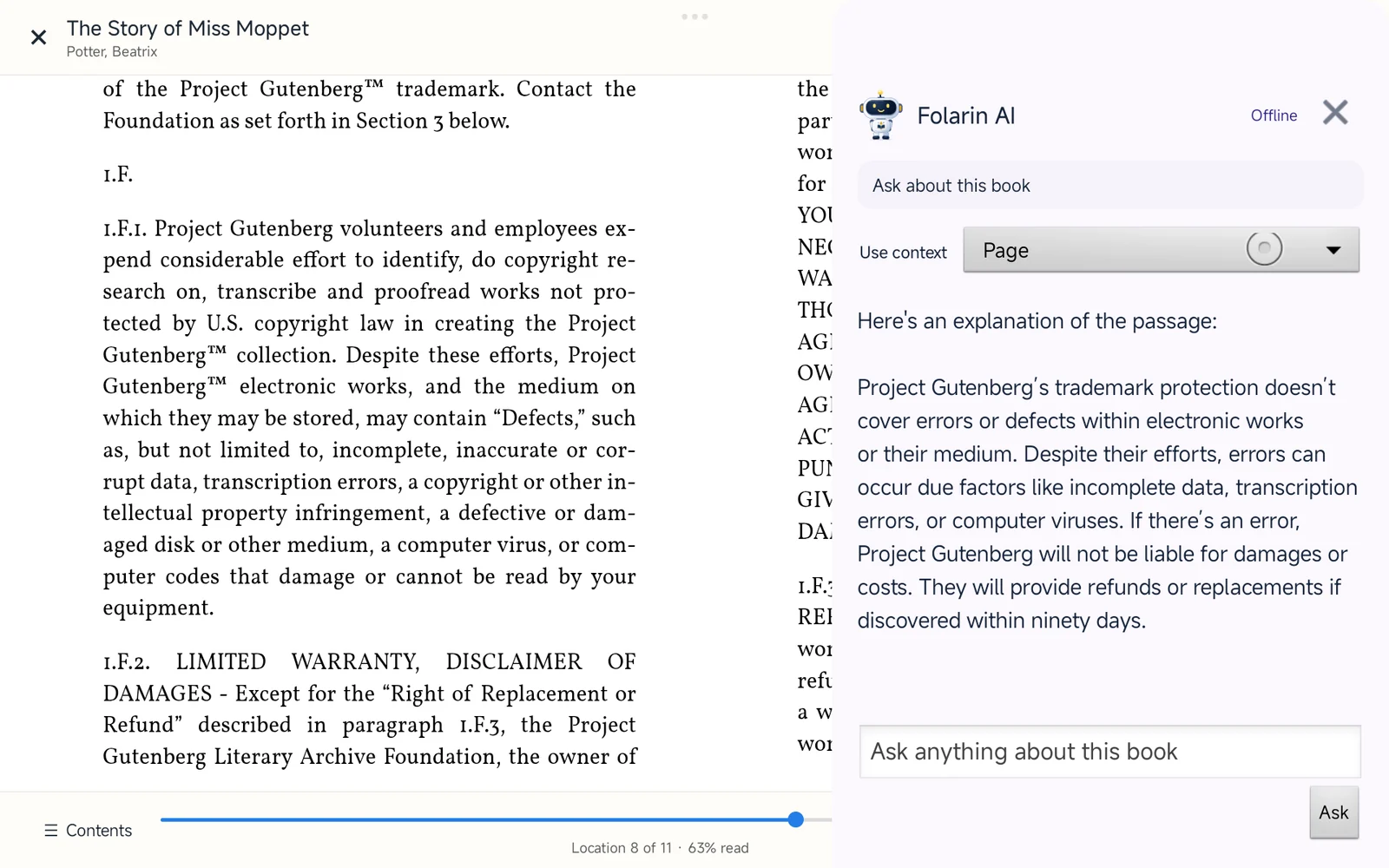
Open the companion from your book, choose the context and type your question. Keep the text in sight while the conversation develops.

Your book and an answer, together
Actual reader capture
The Story of Miss Moppet remains open on an Android tablet while Folarin AI uses Page context and displays an offline explanation in the side panel
Genuine Android tablet capture from internal test build 68: a book is open, Page context is selected, and an offline answer appears beside it. This panel preview may differ from your installed release. View full size
  1. 1
    Choose the context

    Use a passage or the available page context.

  2. 2
    Ask in your own words

    Type what you want to understand.

  3. 3
    Keep your book open

    Read the answer alongside the source text.

Start with the words in front of you

Your question.
Your reading context.

Select a passage when you want help with specific words. Use the available context controls when you want to discuss more of the book. Then ask naturally, in your own words.

The companion works from the text it can access. Providing the relevant passage usually produces a more useful answer than asking about a title alone.

Explore the reading app
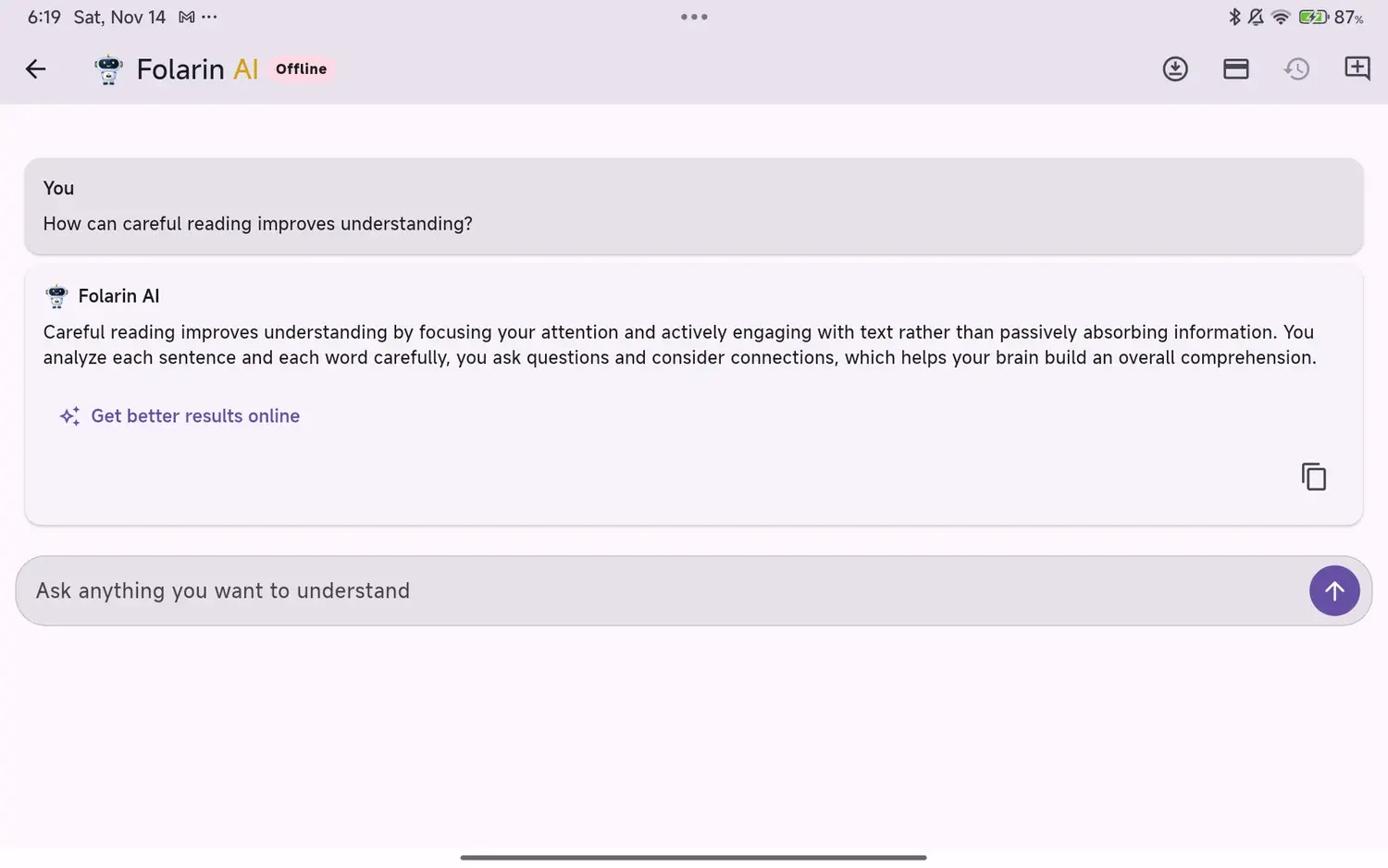
An actual offline Folarin AI response captured from an Android tablet
Actual offline response captured in the Android app. Answers vary with the question and available context.

More than a chat box

Make room for curiosity.

There is no special script to learn. Begin with what you want to understand, then ask the next question.

01

Make a difficult passage clear

Ask for a simpler explanation, the meaning of a word, or an example that makes an unfamiliar idea easier to grasp.

Explain this passage in plain language.
02

See the bigger picture

Discuss themes, compare ideas and work through questions using the reading context available to the companion.

How does this idea connect to the chapter?
03

Cross a language barrier

Request a translation of a selected passage, or ask for an explanation in a language you understand more comfortably.

Translate this passage into French.
04

Turn reading into understanding

Ask for a short recap, study questions or a step-by-step explanation. Follow up in your own words whenever you need more detail.

Ask me three questions about what I just read.

These are example prompts, not prewritten answers. Capabilities depend on the chosen mode, supported language and accessible text. Check important details against your book.

Folarin AI robotic reading companion

Same companion.
Your choice of mode.

Make yourself at home

Let’s set up your AI.

  1. 1

    Open Folarin AI in the Android app

    Use the companion on the home screen or from within a supported book reader.

  2. 2

    Choose how you want to get answers

    Review the online subscription, or check offline compatibility, review the agreement and download the model over a reliable connection.

  3. 3

    Bring your first question

    Select reading context if it helps. The Online or Offline label shows the active mode, without filling your conversation with extra controls.

Good to know

A little clarity
before you begin.

Your reading, your device and your choice of AI.

Read the app privacy notice
Is Folarin AI one companion or two different products?

It is one Folarin AI companion, whether you open it from the app home screen or while reading a book. Online and Offline describe how an answer is produced. The mode label in the app helps you see which one is being used.

Can I use Folarin AI without an AI subscription?

Yes. The downloaded offline model does not require an AI subscription on compatible Android devices. You need an internet connection and sufficient storage to download it first. Online AI is a separate subscription, with its current price and usage allowance shown in the app.

Is online AI included with lifetime Reader Pro?

No. Reader Pro is the optional lifetime upgrade for reading and library features. Online Folarin AI has a separate subscription. You do not need Reader Pro or an online AI subscription to use the supported offline AI model.

Will the offline download work on every Android phone?

No. The app checks device compatibility before allowing the download. Local AI needs enough available memory and storage. Speed and capability depend on your device, the question and the amount of text. On unsupported devices, use online AI with an internet connection and an eligible subscription.

What does Folarin AI know about the book I am reading?

The reader can provide context such as a selected passage or available book text. Use the context controls to choose what you want to discuss. A book title alone does not mean every page has been supplied to the model. Results depend on extractable text, the available context and the chosen mode; scanned or protected content may have limitations.

What happens to my questions and book text?

Offline answers are generated on your device with the downloaded model. For online answers, your request and the relevant reading context are sent to the online service for processing. Ordinary app account, download and subscription services can still use the internet. See the mobile app privacy notice for more detail.

Can I continue reading while I ask a question?

Yes. The reading companion opens in a panel over the reader rather than requiring you to leave the book. You can use the visible reading area, select a passage and close the panel when you are finished. The layout adapts to phones and tablets.

Are AI answers always correct?

No. Both modes can misunderstand a passage or make mistakes. Offline AI has more limited reasoning and language coverage than online AI. Check important details against the original text, and use qualified advice for decisions involving health, law or finance.

Can I use these AI features in the website reader?

This page describes Folarin AI in the Folarin Bookstore Digital Android app. The Online Book Reader on this website is a separate reading experience; the app features shown here should not be assumed to be available in the browser reader.


Folarin Bookstore Digital

Keep your curiosity
close to the page.

Discover books, settle into your library and meet your reading companion.

Get it on Google Play

Folarin AI is available in the Android app. Offline download requires a compatible device; online AI requires a separate subscription.

Folarin AI robotic reading companion